
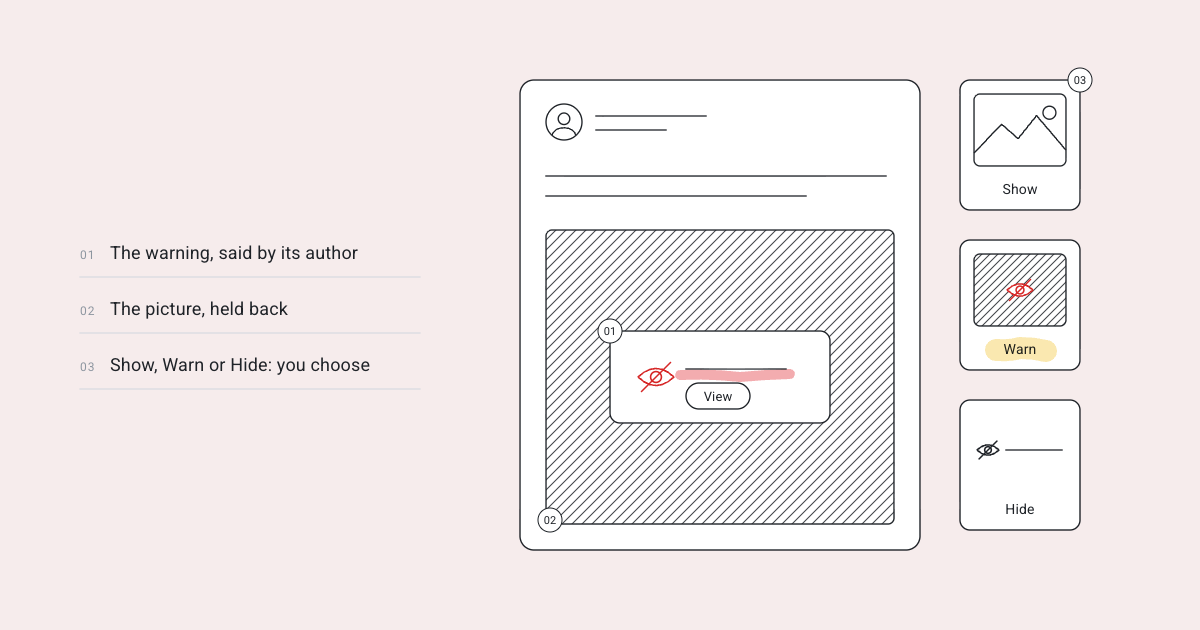

Some posts aren’t suitable for every reader at every time. These include topics like grief, violence, nudity, or movie spoilers. When we introduced content warnings, our primary goal was to avoid censorship while still providing readers with the option to consent. Anahita doesn’t remove sensitive content; it simply asks.
The author pre-emptively flags their post as sensitive content
Any post on Anahita can include a warning, which can be a note, photo, video, article, topic, or reply. There are five types: four Bluesky-specific categories (adult content, sexually suggestive material, graphic media, and non-sexual nudity) and an author-written warning, reflecting the fediverse’s style.
The warning goes with the post wherever it’s sent.
On Mastodon and the rest of the fediverse, a post’s pictures are blurred and its words shown; a post of words alone is shown behind its warning.
On Bluesky, it carries the matching label, so its pictures are blurred for people who asked to be warned. Warnings come in from both networks too: a post from elsewhere keeps its pictures, behind its warning.
Readers get to choose
Under Settings › Content, each person chooses, for each kind, what they see:
- Show: the post as any other.
- Warn: the warning, with the post blurred behind it until they choose to view it.
- Hide: in a list, one quiet line, “Hidden: graphic media”, which opens the post if pressed.
Every kind starts at Warn, so that seeing any of it is something a reader chose. What somebody chose not to see is theirs alone: nobody else, including an administrator, can read it.
What happens if an author doesn’t pre-emptively flag their post as sensitive content?
A reader can report it, and administrators can add a content warning. The author is notified, and the warning remains in place. While the author can ask for clarification, they can’t remove the warning.
AI generated content
This type of content is labelled as “Made with AI,” indicating its source rather than its actual content. This approach ensures transparency, as a subtle line beneath the post indicates this. Readers can still choose to be warned of it, or hide it, like any other kind.
Some image files explicitly state that they were created using AI, and this information is included in the standard fields used by image editing software. When you select such a file in the composer, Anahita automatically marks the post as “Made with AI” and provides a brief explanation. You can take it off. And a reader can report a post as “Made with AI, not marked”.
This feature is available with Anahita Services version 1.3.4 and the accompanying web app. As always, the documentation provides detailed explanations of how each component functions.