
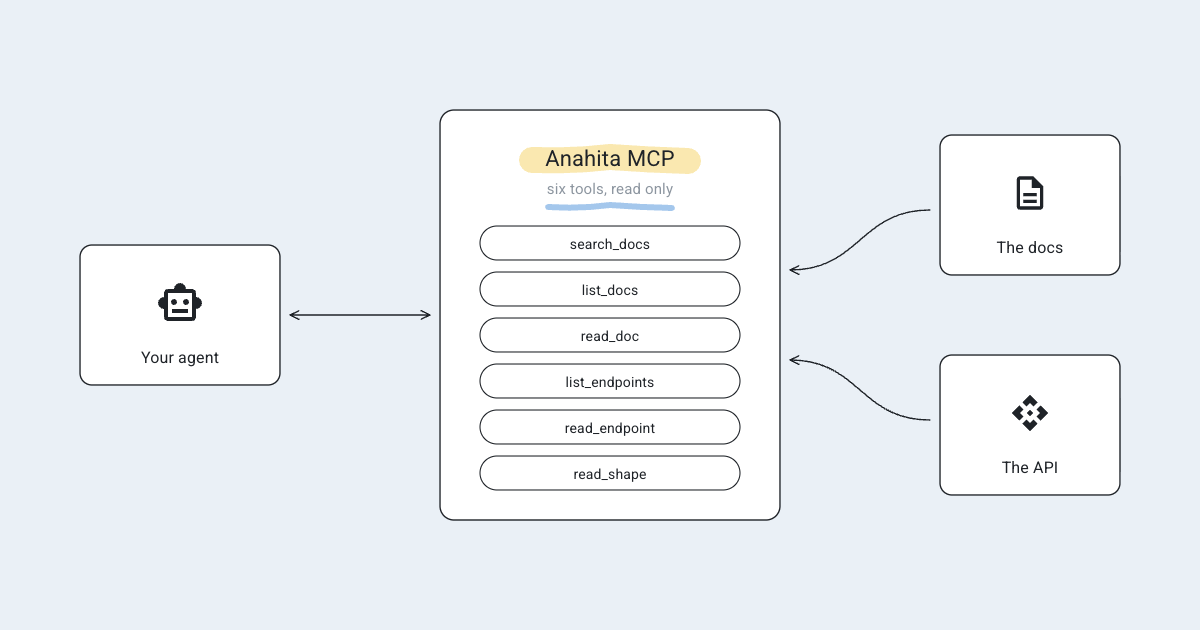

For those of you who don’t like reading technical documentation, we’ve set up an MCP server for you so your AI agent can read Anahita’s latest documentation and API reference, rather than relying on what it remembers. You can add it to Claude, Cursor, VS Code, or any other MCP client. Then, ask questions like how to set up a site, how federation works, or which API route follows a profile and what it sends back.
What is MCP?
The Model Context Protocol (opens in a new tab) is an open standard that connects AI assistants to sources they can trust: a tool the assistant calls, instead of a guess based on its training.
Why use it?
Anahita changes every week, but an agent’s memory doesn’t. With Anahita MCP, your agent:
- Quotes the docs as they are today, with the address of the page each answer came from.
- Consults the API reference to determine the exact route, who can call it, its requirements, and all the answers it provides.
- Stops guessing at links and routes that don’t exist.
It’s for people who run an Anahita site and people who build on it, on their own or with an AI assistant.
How it works
- Six tools, all read only.
search_docs,list_docsandread_docfor the docs;list_endpoints,read_endpointandread_shapefor the API. None of them changes anything. - Two files. It reads the docs and the API reference from www.anahita.io (opens in a new tab), which writes them on every change and every night from the docs of Anahita Services (opens in a new tab) and Anahita Web (opens in a new tab).
- Search by words, in the server itself: no embeddings, and no outside service.
- Nothing sent. On your computer, it keeps a copy of the two files and searches them there; your questions never leave your machine through it, and it works offline with what it fetched last. The hosted copy keeps no record of the questions or who asked them.
Setting it up
With nothing to install
Anahita runs a copy at https://mcp.anahita.io/mcp, in Montreal.
| Client | How |
|---|---|
| Claude Code | claude mcp add --transport http anahita https://mcp.anahita.io/mcp |
| Claude Desktop and claude.ai | Settings › Connectors › Add custom connector, with the address |
| Cursor | "anahita": { "url": "https://mcp.anahita.io/mcp" } under mcpServers in ~/.cursor/mcp.json |
| VS Code | "anahita": { "type": "http", "url": "https://mcp.anahita.io/mcp" } under servers in .vscode/mcp.json |
On your computer
You need Node.js (opens in a new tab) 20 or later. Your client runs the server with npx, which fetches it from npm the first time.
Claude Code
claude mcp add anahita -- npx -y anahita-mcp
Claude Desktop, in Settings › Developer › Edit Config, then restart Claude:
{
  "mcpServers": {
    "anahita": {
      "command": "npx",
      "args": ["-y", "anahita-mcp"]
    }
  }
}
Cursor, in ~/.cursor/mcp.json, or .cursor/mcp.json in a project: the same as Claude Desktop.
VS Code, in .vscode/mcp.json, or with MCP: Add Server from the command palette:
{
  "servers": {
    "anahita": {
      "type": "stdio",
      "command": "npx",
      "args": ["-y", "anahita-mcp"]
    }
  }
}
Any other client: the command is npx -y anahita-mcp, over standard input and output.
Asking it
Then ask your agent something like:
- How does Anahita decide what an old post is worth?
- Which API route lets a person follow a group, and what does it send back?
Common issues
My agent does not use it. Some agents answer from memory unless told otherwise. Add a line to your project's AGENTS.md or CLAUDE.md: "For anything about Anahita, use the anahita MCP tools, and cite the pages they return."
It does not connect. Check that Node.js 20 or later is installed (node --version), or use the hosted copy, which requires nothing to be installed.
Troubleshooting
The MCP Inspector (opens in a new tab) shows what the server offers and lets you call each tool by hand:
npx @modelcontextprotocol/inspector npx -y anahita-mcp
If the six tools are listed and search_docs answers, the server is working, and the problem is in the client's settings.
Open source
Anahita MCP is MIT-licensed, written in TypeScript on the official MCP SDK, and on GitHub (opens in a new tab), where its README explains how to host your own copy.